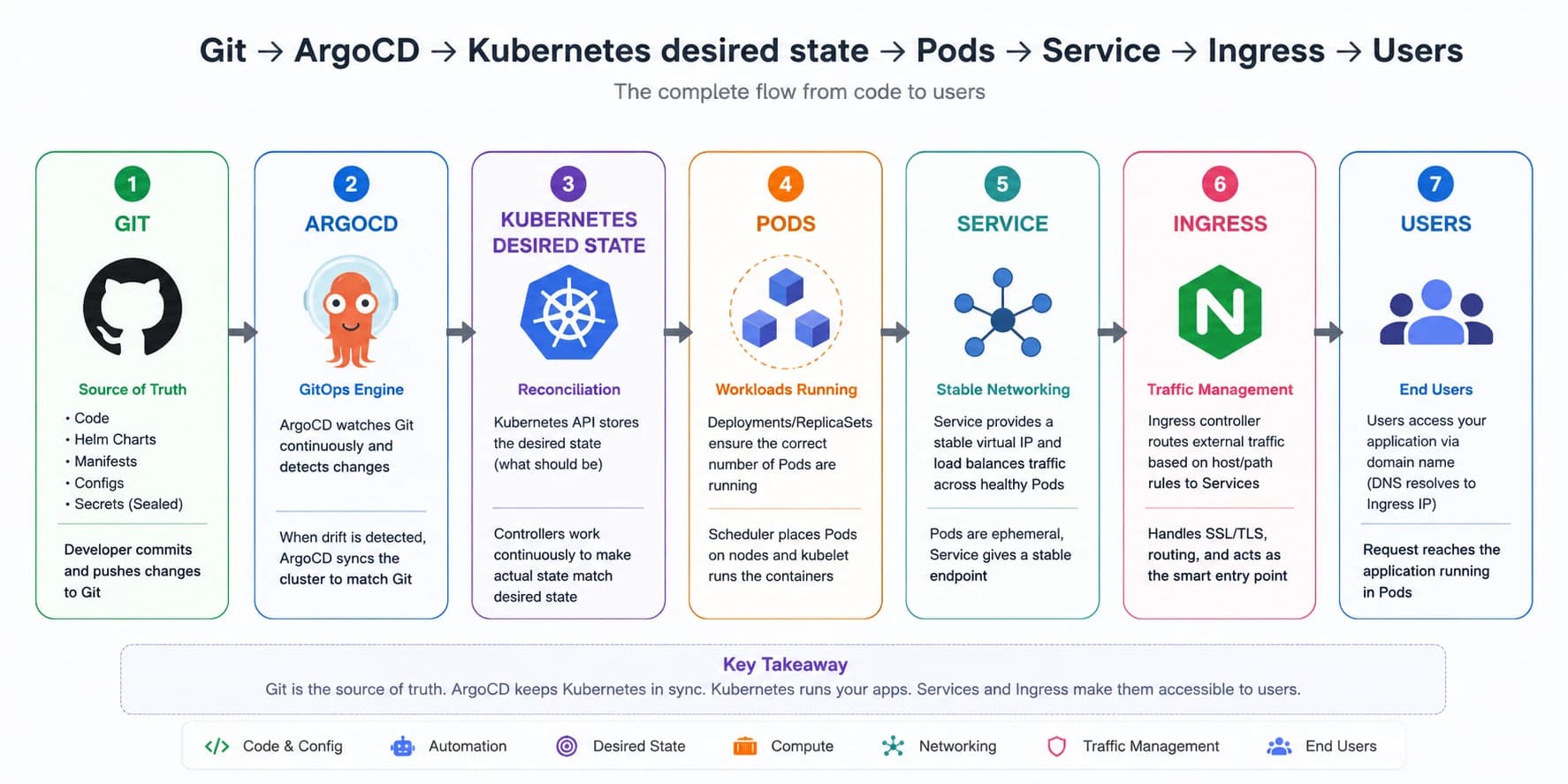
🎯 Big picture of production Kubernetes infra.
Read top-to-bottom - each layer builds on the previous one.
The One Rule That Makes Kubernetes Click
Kubernetes is a reconciliation engine.
- You declare what you want (desired state)
- Kubernetes keeps reconciling until reality matches (actual state)
If you remember only one thing: Kubernetes continuously compares desired vs actual and fixes the drift.
Layer 0 — The Cluster Itself
KUBERNETES CLUSTER
├── CONTROL PLANE (cloud-managed in EKS — you don’t touch this)
│   ├── API Server      ← every request goes here (kubectl, ArgoCD, controllers)
│   ├── etcd            ← stores all cluster state (source of truth)
│   ├── Scheduler       ← decides which Node runs each Pod
│   └── Controller Mgr  ← reconciles desired state vs actual state (self-healing)
│
└── WORKER NODES (your EC2 instances)
    ├── kubelet         ← runs and monitors Pods on this node
    ├── kube-proxy      ← handles Service networking (iptables rules)
    └── Pods            ← your actual apps (containers)
What each part does (in simple terms)
- API Server: the front door of Kubernetes. Everything talks to it.
- etcd: the database of the cluster - holds the truth (state).
- Scheduler: decides which node should run a new pod.
- Controller Manager: keeps the cluster healthy by reconciling state.
- kubelet: runs containers on nodes and reports health.
- kube-proxy: networking glue for Services → Pods routing.
- Pods: where your application containers actually run.
Layer 1 - ArgoCD (Git is the Brain)
ArgoCD enables GitOps:
- Git becomes the source of truth
- ArgoCD continuously checks Git vs cluster
- If there’s drift, it syncs the cluster back to Git state
- Rollback becomes: git revert + push
GitHub Repo (source of truth)
│
├── argocd/bootstrap.yaml          ← apply ONCE manually to seed everything
│       ↓
├── argocd/infrastructure/          ← ArgoCD App manages cluster-level infra
│   ├── namespaces.yaml               (app namespaces, ingress namespaces)
│   ├── ingress-nginx.yaml            (ingress controller install)
│   └── ingress.yaml                  (routing rules: domain → services)
│
└── argocd/apps/                    ← ArgoCD App manages all services
    ├── app1.yaml
    ├── app2.yaml
    └── app3.yaml
            ↓ each points to →
    apps/<service>/                 ← Helm chart per service
    ├── Chart.yaml
    ├── values/local.yaml             (image tag, replicas, resources)
    └── templates/
        ├── deployment.yaml
        ├── hpa.yaml
        └── secrets/local.yaml        (SealedSecret)
GitOps flow (clean + repeatable)
- Update image tag in
values/local.yaml - Push to GitHub
git push - ArgoCD detects drift
- ArgoCD syncs cluster
- Kubernetes reconciles until ready
🚫 No manual kubectl edits in production-style workflows.
Layer 2 — Ingress (The Front Door)
Ingress is how internet traffic reaches your pods.
User request
    ↓
Route53 (DNS: api.example.com → NLB IP)
    ↓
AWS NLB (created by ingress-nginx on EKS)
    ↓
ingress-nginx controller (pod inside cluster)
    ↓ matches host + path rules
Ingress resource  ← you define: host/path → which Service
    ↓
Service (ClusterIP — stable virtual IP, load balances via labels)
    ↓
Pods (your app containers)
What this layer solves
- TLS termination: HTTPS certificates at ingress level
- Routing: host/path → service mapping
- Load balancing: service spreads traffic across replicas
- Single entry point: many apps behind one front door
Quick mental model
- Ingress decides where traffic should go.
- Service decides which pods should receive it.
Layer 3 — Sealed Secrets (Safe Secrets in Git)
GitOps wants everything in Git - but secrets can’t be plaintext.
Sealed secrets solve that problem safely.
DEV WORKFLOW
  Developer has plaintext secret
      ↓ kubeseal --cert (cluster public key)
  SealedSecret (encrypted YAML) → committed to Git
      ↓ ArgoCD syncs
  sealed-secrets-controller decrypts inside cluster
      ↓ creates
  K8s Secret
      ↓ injected as
  ENV VARS inside Pod

WHY THIS MATTERS
  Git has only encrypted data → safe to commit
  Only the cluster can decrypt (private key stays in cluster)
  New cluster = new key = must re-seal all secrets
What you gain:
- encrypted secrets in Git
- auto-sync via ArgoCD
- only cluster can decrypt
Layer 4 — DNS (How Traffic Finds Services)
Kubernetes DNS works at two levels:
External DNS (Internet)
- Route53 maps your domain → Load balancer IP → ingress → service → pods
Internal DNS (Inside the cluster)
CoreDNS provides service discovery inside Kubernetes:
- Short form:
service-name(same namespace) - Full form:
service-name.namespace.svc.cluster.local
Example:
mongodb://mongo.personal-apps.svc.cluster.local:27017
# or if same namespace:
mongodb://mongo:27017
Layer 5 — Security (Defense in Layers)
Security in Kubernetes is layered (not a single feature).
LAYER 1: Network isolation
  Namespaces    → logical separation (apps, ingress, argocd)
  NetworkPolicy → pod-level firewall (who can talk to whom)

LAYER 2: Secret management
  Sealed Secrets → encrypted in Git, decrypted by cluster only
  K8s Secrets    → injected into pods (not hardcoded in images)

LAYER 3: Identity and access (RBAC)
  ServiceAccount per app → pod identity
  Role/RoleBinding       → what that pod can do in K8s API
  Principle: least privilege

LAYER 4: Cloud identity (AWS)
  IRSA (IAM Roles for Service Accounts)
  ServiceAccount → AWS IAM Role via OIDC
  Pod gets AWS creds automatically (no access keys stored)

LAYER 5: Workload protection
  Resource limits      → prevent noisy neighbors
  readinessProbe       → bad pods never receive traffic
  PodDisruptionBudget  → minimum replicas during node drain
Bank-grade security starts with:
- least privilege
- isolation by default
- secrets outside images
- strong auditability
Layer 6 - Scaling & Resilience
HORIZONTAL SCALING
  HPA watches CPU/memory → adds/removes pod replicas
  Cluster Autoscaler watches pending pods → adds/removes nodes

ZERO-DOWNTIME DEPLOY
  Deployment rolling update:
    maxUnavailable: 0  → don't reduce capacity
    maxSurge: 1        → add new pod first
    readinessProbe     → traffic only to healthy pods
    terminationGracePeriodSeconds → finish in-flight requests

HA ACROSS FAILURES
  pod anti-affinity   → replicas on different nodes
  multi-AZ nodes      → replicas across availability zones
  StatefulSet         → stable identity for databases (db-0, db-1)
If you want reliability, you need:
- probes
- safe rollouts
- spreading replicas
- autoscaling
The Complete Flow (Deploy → Serving Traffic)
1. DEV: update image tag in values/local.yaml → git push
2. ARGOCD: detects diff between Git and cluster → runs helm upgrade
3. KUBERNETES: Deployment creates new pods → Scheduler places them on nodes
4. NODE: kubelet starts containers → readinessProbe runs
5. TRAFFIC: Service routes only to ready pods (old pods still serve until new are ready)
6. CLEANUP: Old ReplicaSet pods terminated gracefully
7. ROLLBACK: git revert → push → ArgoCD syncs back (or kubectl rollout undo)
This is how real production systems stay:
- repeatable
- auditable
- safe to roll back
What Connects What (The Glue)
| From | Connects via | To |
|---|---|---|
| Service | label selector (app: myapp) | Pods |
| Deployment | label selector | ReplicaSet → Pods |
| Ingress | Service name + port | Service |
| ArgoCD Application | Git path + Helm values | K8s objects |
| SealedSecret | cluster key | K8s Secret |
| K8s Secret | envFrom / volume mount | Pod env vars |
| ServiceAccount | RoleBinding | Role (RBAC permissions) |
| ServiceAccount | OIDC annotation | AWS IAM Role (IRSA) |
| PVC | StorageClass | PV (actual disk) |
Final Takeaway
Don’t memorize definitions. Memorize the pipeline:
Git → ArgoCD → Kubernetes desired state → Pods → Service → Ingress → Users